
Module
- Module in python is a file i.e. every
.pyfile is a module - Module consits of
- variables
- methods
- classes
- Modules can be used in two ways
- executable
- library
- Refer Here from Programiz
:imp: Dunder in python
- dunder (double underscore) around anything in python has a special meaning predefined
- dunder methods or members are also called as special members or methods
Here is a table summarizing common Python dunder (double underscore) methods and their descriptions:
| Dunder Method | Description |
|——————–|——————————————————————————————————-|
| __init__ | Constructor method; initializes a new object instance with attributes. |
| __str__ | Returns a user-friendly string representation of an object (used by print() and str()). |
| __repr__ | Returns a developer-focused string representation of an object for debugging (used by repr()). |
| __add__ | Implements addition (+) between objects. |
| __sub__ | Implements subtraction (-) between objects. |
| __mul__ | Implements multiplication (*) between objects. |
| __truediv__ | Implements true division (/) between objects. |
| __floordiv__ | Implements floor division (//) between objects. |
| __mod__ | Implements modulo operation (%) between objects. |
| __pow__ | Implements exponentiation (**) between objects. |
| __len__ | Returns the length of an object (used by len()). |
| __getitem__ | Retrieves an item from an object using the indexing syntax (obj[key]). |
| __setitem__ | Sets an item in an object using the indexing syntax (obj[key] = value). |
| __delitem__ | Deletes an item from an object using the indexing syntax (del obj[key]). |
| __iter__ | Returns an iterator for the object (used in loops like for x in obj). |
| __next__ | Returns the next item from an iterator (used with iterables). |
| __eq__ | Implements equality comparison (==). |
| __ne__ | Implements inequality comparison (!=). |
| __lt__ | Implements less-than comparison (`). |ge
|| Implements greater-than-or-equal-to comparison (>=). |call
|| Makes an object callable like a function. |enter
|| Defines behavior when entering a runtime context (used inwithstatements). |exit
|| Defines behavior when exiting a runtime context (used inwith` statements). |
This list highlights some of the most commonly used dunder methods, but Python includes over 100 such methods, each serving specific purposes for customizing class behavior.
Citations:
[1] https://www.codecademy.com/resources/docs/python/dunder-methods
[2] https://builtin.com/data-science/dunder-methods-python
[3] https://www.reddit.com/r/Python/comments/1bioxer/every_dunder_method_in_python/
[4] https://blog.finxter.com/python-dunder-methods-cheat-sheet/
[5] https://codingnomads.com/python-common-dunder-methods
[6] https://www.codecademy.com/resources/docs/python/dunder-methods/str
[7] https://realpython.com/python-magic-methods/
[8] https://dbader.org/blog/python-dunder-methods
__name__:
Lets create a module
- Create a new folder with utils.py and main.py
- In utils.py add the following code
"""This module consists of reusable functions

List of Functions

* is_prime
* is_factor
"""

def is_prime(number):
    """This function check if the number is prime or not

    Args:
        number (int): number to be checked

    Returns:
        bool: True if prime false otherwise
    """
    result = True
    for index in range(2,number):
        if number % index == 0:
            result = False
            break
    return result

def is_factor(number, index):
    """This function checks if index is factor of number

    Args:
        number (_type_): _description_
        index (_type_): _description_

    Returns:
        _type_: _description_
    """
    return number % index == 0
- Now create a main.py
- assumption:
- main.py is executable
- utils.py is library
- To use is_prime from utils.py in main we need to use import
- Approach 1
import utils

number = int(input("Enter the number of your choice "))
if utils.is_prime(number):
    print(f"{number} is prime")
else:
    print(f"{number} is not prime")
-
Refer Here for changes

-
Another Import style : Refer Here for change set
"""This module explains import of functions from other modules
"""
from utils import is_prime

number = int(input("Enter the number of your choice "))
if is_prime(number):
    print(f"{number} is prime")
else:
    print(f"{number} is not prime")
- Aliasing
"""This module explains import of functions from other modules
"""
from utils import is_prime as i_p

number = int(input("Enter the number of your choice "))
if i_p(number):
    print(f"{number} is prime")
else:
    print(f"{number} is not prime")
Purpose name
The __name__ variable in Python is a special built-in variable that determines how a script or module is executed. Its primary purpose is to differentiate between when a Python file is run directly as a script or imported as a module.
Purpose of __name__:
- Script Execution:
- When a Python file is run directly, the
__name__variable is automatically set to"__main__". -
This allows specific blocks of code to execute only when the script is run directly, not when it is imported.
-
Module Import:
- When a Python file is imported into another script, the
__name__variable is set to the name of the module (i.e., the filename without the.pyextension). - This prevents unintended execution of code during import.
Common Usage:
The most common use of __name__ is in the following construct:
if __name__ == "__main__":
    # Code here will only run when the script is executed directly
    print("This script is running directly.")
else:
    # Code here will run when the script is imported as a module
    print("This script has been imported.")
Example Scenarios:
- Running as a Script:
“`python
# my_script.py
def greet():
print(“Hello from my_script!”)
if name == “main“:
greet()
When you execute `python my_script.py`, the output will be:
Hello from my_script!
“`
- Importing as a Module:
python

   # another_script.py

   import my_script
The output will be empty becausegreet()is not called unless explicitly invoked.
Benefits:
- Code Reusability: Allows code to function both as a standalone script and as an importable module.
- Avoids Unintended Execution: Prevents execution of certain code blocks during imports, which could lead to unexpected behavior or performance issues.
This construct (if __name__ == "__main__") is widely used in Python for writing modular, reusable, and maintainable code[1][2][3][4].
Citations:
[1] https://www.freecodecamp.org/news/whats-in-a-python-s-name-506262fe61e8/
[2] https://builtin.com/articles/name-python
[3] https://realpython.com/if-name-main-python/
[4] https://community.aws/content/2eEahNZZ1tobTtQ7t6JWp7hPpJf/what-s-with-the-name-variable-in-python
[5] https://www.freecodecamp.org/news/if-name-main-python-example/
[6] https://www.freecodecamp.org/news/python-attributes-class-and-instance-attribute-examples/
[7] https://www.toptal.com/python/python-class-attributes-an-overly-thorough-guide
[8] https://www.w3schools.com/python/python_variables_names.asp
Package
- A Package is collection of modules which are organized with in sub directories optionally.
- A folder becomes a package when it has a file
__init__.py -
Refer Here for the sample package written in the classroom
-
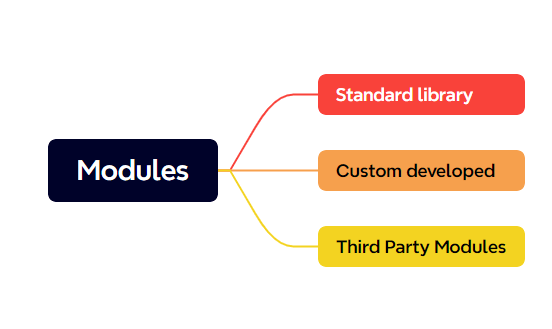
Modules
- Package is an unit of distribution in Python. All of the open/community packages are published to pypi
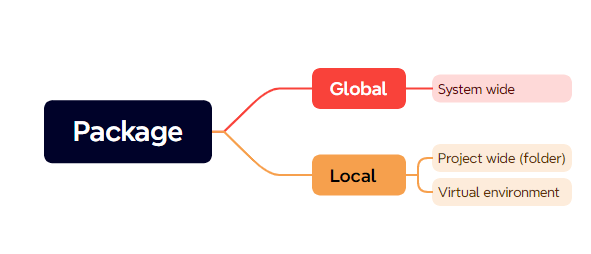
- To download packages into your system we need to understand global and local packages
- To download packages we have 3 possible approaches
- pip
- pipx
- poetry
