
UV
- Refer Here for uv installation
- Creating python projects using uv and adding dependencies
- create a directory
mkdir library_management
cd library_management
- create a project using command
uv init --package .
unit testing – pytest
- Lets add pytest to the project
- After activating virtual environment
pip install pytest
- with uv
uv add --dev pytest
Creating a project with unit testing enabled
- Create a new directory math_learning and cd into it
mkdir math_learning
cd math_learning
- lets create a python package
uv init --package .
- Now open vscode
code .
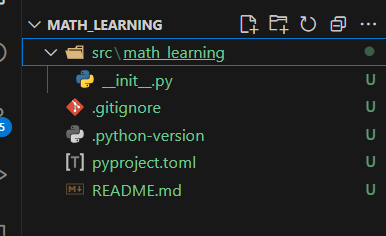
* open pyproject.toml file and change the version and description
* lets create a virtual environment
uv venv .venv
# or
uv sync
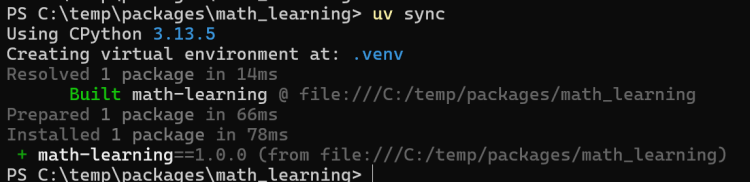
- Activate virtual environment in terminal
# for windows
.\.venv\Scripts\activate


# for mac or linux
source .venv/bin/activate
-
Now select interpreter in vscode
Ctrl+Shift+p=> python: Select Interpreter

-
Now lets add pytest as dev depenency
uv add --dev pytest
- Add the following section to the pyproject.toml
[tool.pytest.ini_options]
minversion = "7.0"
addopts = "-ra -q"
testpaths = [
    "tests"
]
- After this run
uv run pytestwhere you should see some warnings. - Create the tests folder
uv run pytest - Create a python mymodule
my_math.pywith simple add function
def add(a: int, b: int) -> int:
    return a + b
- Now add a file in tests folder with with name
test_mymath.py
Lets work on library management system
- lets call this as lms
Persistence
- To store the data we can use
- files: files come in various extensions (csv, json, yaml) and forms (binary/text)
- databases
Learning how to persist the data (read/write) from files
context managers in python
Exceptions and Errors

-
Refer Here for tutorial and Refer Here for exception handling and Refer Here for custom exceptions
-
We need to
- handle exceptions
- handling exceptions
- raise exceptions
- Creating Custom Exceptions
- handle exceptions
-
Handling exceptions: this is done with try catch finally blocks
-
Refer Here the notebook.
