
System Setup for python
- OS Package Managers
- Softwares:
- Git:
- Mac
brew install git - Windows: Download manually and install to get terminal option or use winget to configure terminal on your own
- Mac
- python 3.13
- Mac
brew install python@3.13 - Windows
winget install --id=Python.Python.3.13 -e
- Mac
- Visual Studio Code
- Windows
winget install Microsoft.VisualStudioCode - Mac:
brew install --cask visual-studio-code
- Windows
- Git:
Setup Visual Studio Code
-
Extensions:
- Python
- Jupyter
-
Command Pallete
- Window
Ctrl+Shift+p - Mac
Cmd + Shift + p
- Window
-
Visual studio code cheatsheet
- Prompt:
As an expert user in visual studio code. I'm beginner is vscode `<what you need>`Give me shortcut to start debugging python code on windows
Debug some program
- Create a new folder
mkdir c:\temp
mkdir c:\temp\practice
cd c:\temp\practice
code .
- Create a new file
main.pyand copy the code from here
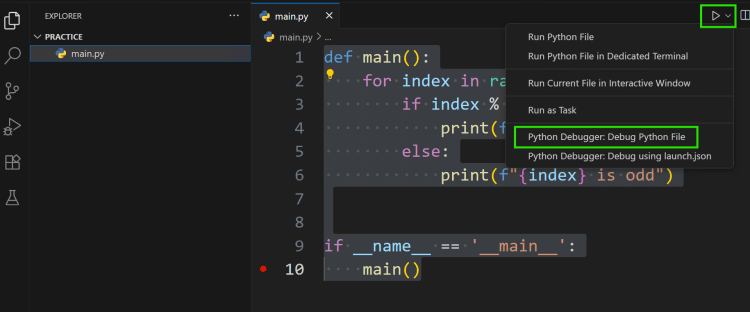
- Debugging terms
- Breakpoint
- Step Over (execute the current line)
- Step Into (Get into the function …)
- Variables:
- Stack Trace/Call Stack
